Troubleshooting: endorctl warning about organizational contact for a namespace (NotFound / no message found)
Last updated: June 16, 2026
Problem encountered
While running Endor Labs CLI (endorctl), especially during SBOM export or consolidation, you may see a warning similar to:
WARNING: there was an issue getting the organizational contact for the namespace :
<your.namespace>, with err : rpc error: code = NotFound desc = no message found
What this means
The CLI is trying to load SBOM organizational contact information (supplier/org name, contact details, URLs) for the namespace shown in the message.
The platform returns no matching organizational contact record for that namespace, which surfaces as gRPC
NotFoundwith descriptionno message found. Essentially, there are no SBOM organizational settings saved.
What this does not necessarily mean
It does not by itself indicate an outage or a broken install. For this specific error, the CLI is designed to continue after logging the warning and proceed without populated organizational contact metadata in the SBOM output.
Solution
If you do not need organizational contact metadata, the warning will still appear when no record exists and the export will still complete. If empty supplier/contact fields in SBOMs are acceptable for your use case, you may accept the warning or filter it in logs.
Fix: configure SBOM organizational settings for the namespace
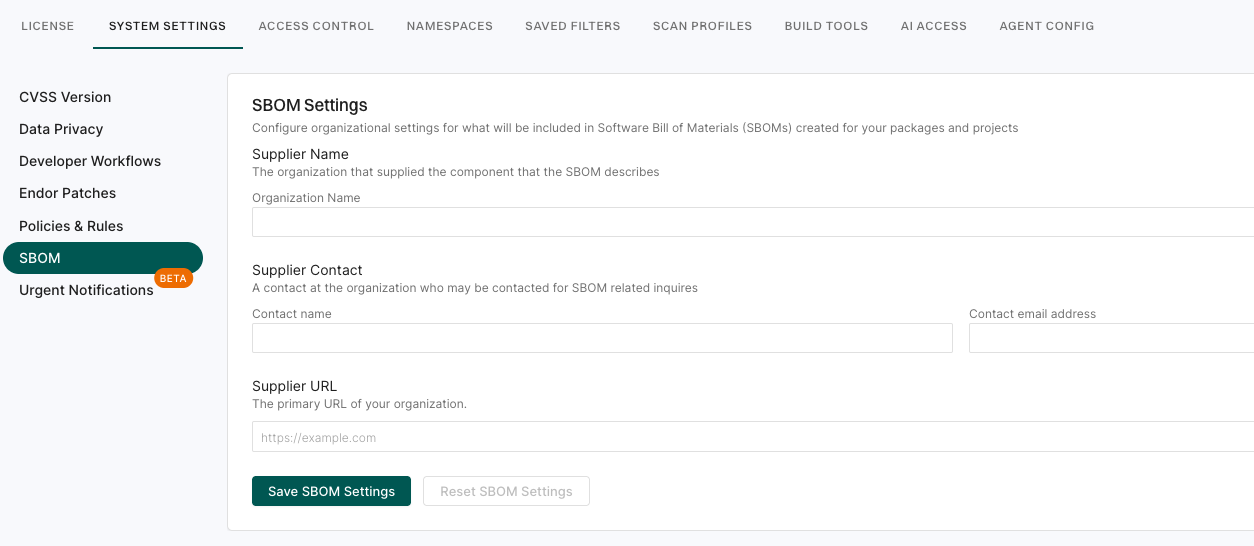
To resolve the warning and to populate supplier / organizational contact fields in exported SBOMs:
Within Endor Labs, open Settings.
Go to System settings → SBOM
Complete the fields appropriate for your organization, for example:
Organizational name
Contact name
Contact email
Supplier / organization URL(s)
Save the settings.
If the warning persists after configuration
Re-check which namespace the warning is specifying.
Confirm you have permission to view or edit system SBOM settings for that namespace.